Run your first simulation
This quickstart runs the demo_316_short thermal example in the Docker image,
then opens its result in VisIt. You do not need to build adamantine or install
its dependencies.
Prerequisites
Install and start:
The commands below use a POSIX shell on Linux or macOS. On Windows, use the equivalent Docker Desktop volume syntax and run the simulation from the folder containing the downloaded files.
Run the example
Create a clean directory and download the two files used by the Thermal Simulation example:
mkdir -p adamantine-demo
cd adamantine-demo
curl -LO https://raw.githubusercontent.com/adamantine-sim/adamantine/release/1.1/tests/data/demo_316_short.info
curl -LO https://raw.githubusercontent.com/adamantine-sim/adamantine/release/1.1/tests/data/demo_316_short_scan_path.txt
Pull the verified image:
docker pull rombur/adamantine:1.1
Run adamantine with the example directory mounted into the container. The user mapping keeps generated files owned by your local user on Linux and macOS:
docker run --rm -it \
  --user "$(id -u):$(id -g)" \
  --mount type=bind,src="$PWD",dst=/tutorial \
  --workdir /tutorial \
  rombur/adamantine:1.1 \
  /home/adamantine/bin/adamantine -i demo_316_short.info
When the run finishes, confirm that the result exists:
ls output*.pvd
The tutorials repository is available for the next step, when you want guided input-file exercises:
Inspect the result in VisIt
VisIt runs on your host computer, so open the generated .pvd file from the
adamantine-demo directory. Do not open an individual .vtu file for this
first check.
- Open the
output*.pvdfile. - Add the temperature field as the plotted scalar.
- Add a Threshold operator.
- Select Scalars, then choose
temperature. - Set the lower bound to
1and apply the operator. - Draw the result.
The threshold hides inactive cells, which have a temperature of zero. Compare
the frame around t = 18e-4 s with the expected result:
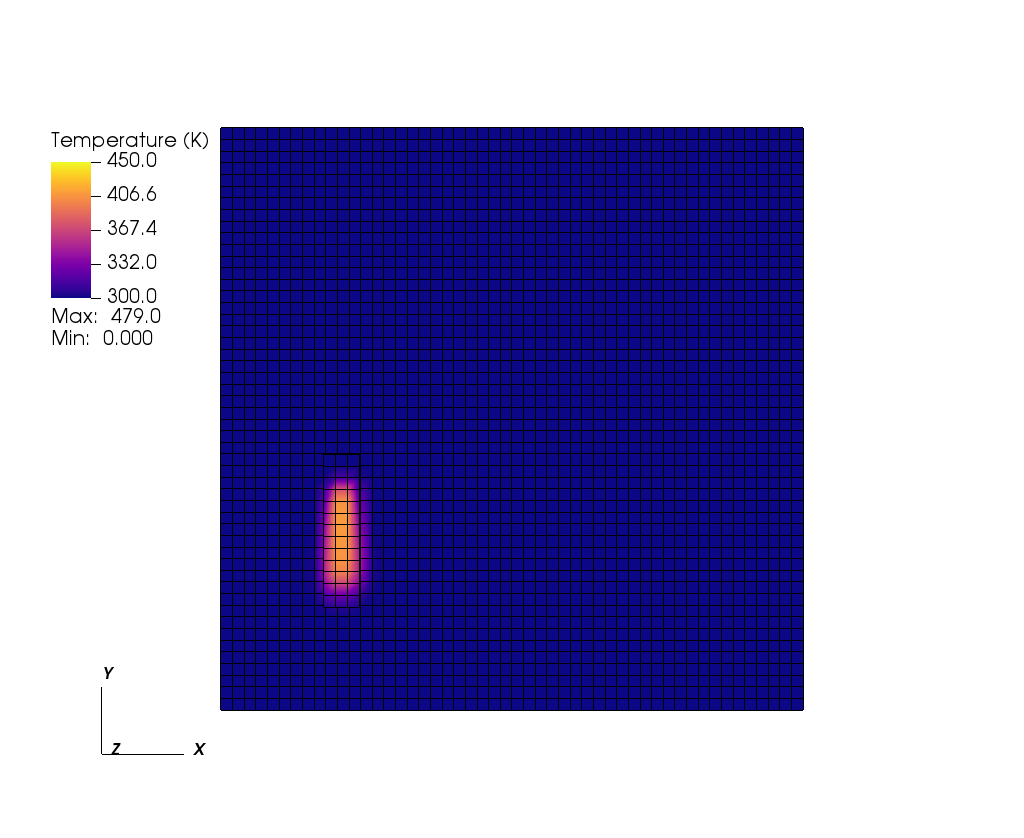
The exact color scale or camera view may differ slightly, but the domain, active region, heat-source location, and overall temperature pattern should match.